
A thick desk can turn a perfectly good lamp clamp into an instant return.
The problem often appears at installation: the clamp clears the desktop at first, then hits a butcher-block apron, a steel standing-desk rail, or a cable tray tucked beneath the rear edge. The advertised desktop thickness may look compatible, yet the lamp still cannot close.
What matters is the usable mounting edge: the unobstructed vertical space from the top surface to the first barrier below it, plus enough flat underside for the clamp pad to sit securely. A 1.5-inch slab with a deep apron can be harder to fit than a thicker plain tabletop. Before choosing a clamp lamp, measuring the edge at the intended position avoids the familiar last-minute shuffle toward a side corner—or abandoning the clamp altogether.
- Measure at the actual mounting spot, not the desk’s exposed front edge.
- Allow room for the clamp screw and pad; an under-desk tray can steal the clearance a spec sheet assumes.
Choose by how the desk is used



Measure the actual clamping zone: desktop thickness plus any lip, apron, cable tray, or reinforcement underneath. Then compare that number with the seller’s current listed clamp capacity—not an old review, photo, or remembered specification.
If the clamp pad cannot sit flat above and below the edge, none of these lamps is a dependable choice, however appealing its lighting features may be.
Why a listed clamp range can mislead
A lamp advertised to open wide enough for a 2-inch desk may still fail on a 2-inch desk. The stated range usually describes the gap between the clamp’s upper pad and lower foot under ideal conditions: flat, parallel, unobstructed surfaces.
Check the mounting spot, not the desk’s thickest or thinnest measurement. The upper pad needs a level patch to sit on, while the lower foot needs solid underside contact. A rounded live edge or a deep top bevel can leave one pad partly suspended, making the lamp prone to slipping or tilting.
Obstructions that spoil an otherwise good fit
- Drawers and keyboard trays: their housings often occupy the first few inches under the front edge.
- Aprons, rails, and metal frames: these reduce usable clearance even when the top itself is thin.
- Modesty panels and cable trays: they can block the clamp screw or prevent it from being turned.
- Thick edge bands or bevels: measure where both pads will land, rather than at the center of the top.
A quick test helps: hold a book or small block under the proposed spot, then confirm there is room to turn the clamp knob through its full travel. If access is tight, mount farther along a clear side edge rather than forcing the front corner.
Measure the clamp zone in three passes
- Measure the full top thickness
Measure from the desktop surface to its underside at the exact mounting point. Include any built-in edge banding, desk mat, or protective pad that will stay under the clamp.
- Check clear depth below the edge
Look inward from the edge for the depth the lower jaw and tightening screw need. A shallow apron, drawer rail, cable tray, or metal frame can block a clamp even when the top itself is thin enough.
- Measure usable edge width
Confirm there is a flat, uninterrupted stretch wide enough for both clamp pads. Avoid rounded corners, seams, grommets, and sections where the edge changes shape.
- Leave room rather than chasing the limit
Choose a clamp range with a little spare capacity beyond the measured thickness. The lamp should tighten squarely without forcing the screw against desk hardware or sitting on a sloped edge.
Measure the whole mounting assembly—top, underside, and edge—not just the visible desktop slab.
A desk can have a thin-looking top yet still reject a clamp because a wooden apron begins just behind the edge. Before choosing among the lamps, hold a ruler under the mounting area and check the available inward clearance. If the lower pad cannot sit flat, the published maximum thickness is irrelevant.
The comparisons favor real desk-edge fit and usable light over headline specifications or maximum claimed reach.
Jaw shape, pad contact, screw clearance, and the amount of desktop left unobstructed matter more than a single thickness number.
Reach is judged at a normal working position, including arm droop, wobble when extended, and whether the beam covers more than a small hotspot.
Controls should remain easy to reach; cable routing should not foul drawers, and the base should reclaim surface space rather than create a new obstruction.
Marketplace dimensions, clamp ranges, and bundled accessories can change without much notice. These are practical, measure-first comparisons—not universal guarantees. Confirm the current listing, then check the actual edge, underside clearance, and nearby supports on the desk.
Airlonv Triple-Head Lamp for Wide Desk Coverage
01 Top choice for customizable, wide-area task lighting
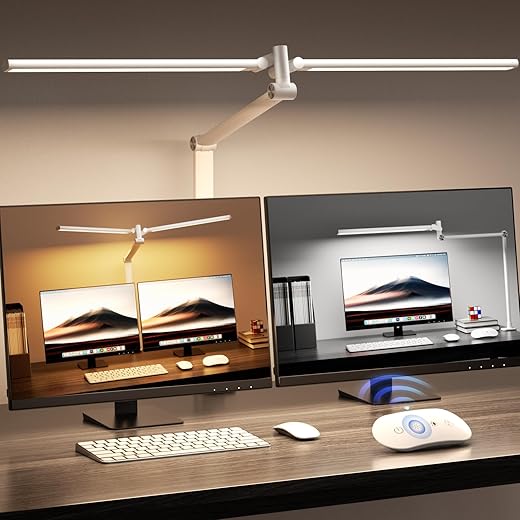
The Airlonv triple-head clamp lamp is the all-around option for a desk that has to serve several jobs at once. Its three LED light sources can be aimed across a monitor bank, over a drawing mat, or toward separate sides of a shared workspace, while the clamp keeps the desktop clear. Stepless brightness and color-temperature adjustment, plus remote control and memory, make it easy to shift from a cool work light to a softer evening setting. Clamp fit still needs confirming against the current listing and the desk’s measured clear edge.
- Three heads spread light across broad work areas
- Stepless brightness and 2700K–6500K color adjustment
- Remote, touch controls, and memory simplify daily changes
- Clamp mounting preserves valuable desk surface
- Three arms need thoughtful positioning around screens
- Current clamp clearance is not stated in the supplied details
- Corded setup still needs a nearby outlet
- Multi-monitor desks
- Craft tables
- Shared workspaces
- Tight rear edges
- Single small tasks
For a thick desk with a genuinely usable clamp zone, this is the strongest all-purpose pick in the group. Three adjustable heads give it more practical coverage than a conventional single-arm lamp, particularly around screens and larger projects. The arms are worth arranging before committing to a final clamp position, and the clamp’s present-day clearance specification should be checked against the desk measurements before purchase.
Airlonv Double-Arm Lamp for Even Ultrawide Coverage
Best for broad, adjustable illumination across large workspaces
The Airlonv Double-Arm Wide-Light Clamp Desk Lamp is built for desks where a single narrow bar leaves the outer monitor edges and paperwork noticeably dimmer. Its two adjustable light sources can spread illumination across an ultrawide display, a large drawing surface, or a broad workbench without relying on a separate side lamp.
That extra span needs room to work. The clamp still requires a clean, sturdy mounting edge, while the arms and gooseneck need open space behind and beside the desk to swing into position. On a crowded wall-side desk or a shallow return, the wider fixture can become more awkward than useful. For setups with ample clearance, it is a more adaptable alternative to clamp lamps whose arms stay put. Adjustable color temperature and stepless dimming help it shift from focused task light to a softer evening workspace.
- Broad, adjustable light spread
- Two independently positionable sources
- Stepless brightness and color control
- Useful for ultrawide screens
- Needs generous arm swing clearance
- Less suited to wall-tight desks
- More visual bulk than a bar lamp
- Ultrawide monitors
- Broad worktops
- Drafting surfaces
- Tight desk corners
- Wall-flush setups
- ~$20 value price
- Stepless 2700K–6500K tuning
- Flexible 17-inch gooseneck
- Compact, restrained footprint
- Smaller light spread than multi-head models
- Less suitable for deep or wide desks
- Clamp clearance still needs measuring
- Small desks
- Focused tasks
- Budget setups
- Ultrawide desks
- Broad work surfaces
- Soft grey finish suits neutral setups
- 17-inch gooseneck directs light precisely
- Stepless 2700K–6500K output
- 1%–100% brightness adjustment
- Focused light, not broad desk coverage
- Clamp capacity should be confirmed on the live listing
- 10W output is modest for large work areas
- Neutral workspaces
- Reading corners
- Compact desks
- Ultrawide desks
- Wide shared tables
Clamp it to a solid edge before putting the arm to work
- Choose a flat, uninterrupted section of edge
Use a solid desktop edge with enough clear material above and below the clamp pads. Avoid beveled lips, cable trays, drawers, and the joint where a desktop meets its frame; those spots can let the lamp twist or sit crooked.
- Seat both pads squarely
Open the clamp only as far as needed, place it fully onto the edge, and make sure the upper pad and lower pad meet flat surfaces. Tighten the screw gradually until the lamp no longer shifts under a light hand push—over-tightening is unnecessary.
- Aim the base before arranging the lamp
Point the arm or gooseneck toward the intended work area while there is still room to rotate the base. A quick look at where a clamp-mounted desk lamp should sit helps keep the mount out of monitor stands, shelves, and the natural path of an elbow.
- Route the cord with slack at moving joints
Run the cord behind the desk or along the rear edge, leaving a relaxed loop near any pivoting arm. Do not pinch it between the clamp and desk, pull it tight across an arm hinge, or run it where a chair wheel can catch it.
- Test the farthest reach and lowest position
Move each head through its full range at the brightness likely to be used. The clamp should remain still, the lamp should not collide with a monitor, and the cord should stay clear; reposition the base if any part strains or snags.
Recheck the clamp after the first day or two of adjustment, especially on a newly assembled desk.
If the lower pad lands on a thin panel, a drawer face, or the edge of a metal rail, stop and choose another location. A lamp can seem secure at rest yet loosen when its arm is extended.
For finished wood or laminate, a thin non-slip protective pad can reduce marks, provided it does not make the clamp uneven. The goal is flat contact—not extra padding.
Buy the clamp fit first, then choose the light pattern
- For a broad multi-monitor desk, prioritize reach only after confirming that the arm can swing without meeting a shelf, wall, or monitor arm.
- A smaller gooseneck lamp is often the tidier choice when the usable rear edge is short or crowded.
The Airlonv Triple-Head Remote-Controlled Clamp Desk Lamp is the strongest all-around pick for a shared workstation or broad desk: its multiple heads and remote controls make it easier to spread light across several zones. It earns its place only where the clamp edge and surrounding swing space are genuinely clear.
For an ultrawide monitor setup, choose the Airlonv Double-Arm Wide-Light Clamp Desk Lamp for more even side-to-side coverage. The Airlonv 17-Inch Black Stepless Clamp Desk Lamp is the practical low-cost choice for a single focused task area, while the 17-Inch Grey Stepless version suits the same compact role when a softer neutral finish fits the desk better. In every case, measured thickness, a flat underside, and nearby obstructions should decide the purchase before coverage, dimming controls, or color.
