
Smart lighting should disappear into the routine, not create another one.
At bedtime, a household wants a single Siri command to dim the lamps, switch off the kitchen, and leave the hallway glowing—without first opening a manufacturer’s app or silencing its notifications. That is the appeal of Apple Home: scenes and automations live alongside the rest of the home rather than behind a separate brand dashboard.
Yet plenty of bulbs advertised as Apple-compatible still make the companion app feel unavoidable for setup, updates, or basic adjustments. Matter changes the equation. With a suitable Apple home hub, compatible bulbs can be added directly in the Home app and then controlled through Siri, schedules, sensors, and shared household access. A maker’s app may remain useful for firmware updates or niche effects, but it should be an optional tool—not the control centre.
- A HomePod or Apple TV serving as a home hub enables automations and control away from home.
- Matter bulbs use the same Home app setup path across brands, making mixed-bulb rooms less awkward.
- Direct Apple Home control
The bulb appears in Apple’s Home app, where it can be switched, dimmed, colored, grouped into rooms, and used in scenes.
- Everyday access
Controls should also be available in Control Center, through Siri, and in Apple Home automations—not only inside the manufacturer’s app.
- Matter or HomeKit
Either label can support Apple Home pairing. Matter is the newer cross-platform standard; HomeKit is Apple’s established native system.
- Optional maker app
A brand app may still be useful for firmware updates, a failed pairing, or animated lighting effects that Home does not expose.
- “Works with assistants”
This wording is not enough. It may mean Alexa or Google Home support only; the box or listing should specifically name Apple Home, HomeKit, or Matter.
App-free means the daily routine stays in Apple Home: setup after pairing, room controls, Siri, schedules, and automations. It does not promise that the manufacturer’s app will never be needed. Keeping it installed for updates is sensible, but it should not be the only route to basic lighting controls.
Check the home setup first
Before ordering, confirm that the bulb is labeled Matter—not merely “works with Alexa” or “smart Wi‑Fi.” Matter is usually the cleanest fit for Apple Home, and Matter lighting support in Apple Home is the compatibility claim worth looking for on the product page or box.
A Wi‑Fi Matter bulb joins the home’s 2.4 GHz Wi‑Fi network directly. It can be a perfectly practical choice, but setup depends on solid Wi‑Fi coverage where the lamp sits.
Thread is different: a Thread-capable bulb should be explicitly identified as such. Thread devices need a compatible Thread border router, such as certain HomePod or Apple TV models. Do not assume a Matter listing includes Thread, or that it will improve performance in every home.
For control away from home and automations that keep running reliably, Apple Home also needs a home hub. A supported HomePod or Apple TV fills that role; without one, local room control may still work, but remote access is limited.
Check for Matter support and the connection type: Wi‑Fi or Thread. If choosing Thread, verify the existing Apple TV or HomePod is a compatible border router.
Buy for the sockets that need light


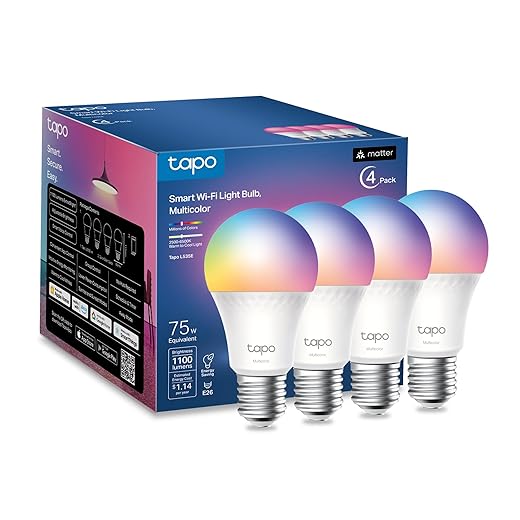

Match the pack to the number of A19/E26 sockets, then choose output: 1,100 lumens is the stronger pick for task-heavy or spacious rooms. Apple Home handles the essentials—on/off, dimming, color, and automations—so music modes, proprietary scenes, and energy dashboards should not decide the purchase unless they will genuinely be used.
A room-ready four-pack for Apple Home
01 Best for affordable Apple Home color lighting
OREiN’s Matter A19 four-pack is a practical first swap for a living room, bedroom, or open-plan area with several ordinary E26 sockets. Each 9W bulb replaces roughly a 60W incandescent, while tunable white light handles everyday lighting and RGB color gives Apple Home scenes a little more range.
Pair each bulb by scanning its Matter code in Apple Home, then group fixtures into one room or scene. Before buying four, confirm that every lamp takes an A19/E26 bulb, the home Wi‑Fi has a 2.4GHz band available, and none of the sockets sits on a traditional dimmer switch.
- Four bulbs for about $25
- Matter pairing in Apple Home
- Tunable whites plus color
- Standard A19/E26 format
- 2.4GHz Wi‑Fi only
- Avoid conventional dimmer switches
- 60W-equivalent output may not suit large, bright rooms
This pack makes the most sense when several fixtures need upgrading at once. Matter keeps setup centered in Apple Home, and four matching bulbs make room scenes feel genuinely useful rather than decorative. Check Wi‑Fi and switch compatibility first; those details matter more when four bulbs are involved.
Best for multi-platform smart home control
Linkind Matter A19 Color Smart Bulbs suit a home that runs on Apple Home today but may not stay Apple-only forever. Once paired to Apple Home, they can handle everyday on/off, dimming, white-temperature changes, and color adjustments alongside other Matter accessories. Their 800-lumen, E26 format is a practical fit for standard lamps and ceiling fixtures.
Matter also leaves room to bring the bulbs into Alexa or Google Home later, rather than replacing them when the household changes platforms. For larger lighting plans, it is worth comparing Hue and Govee options for a multiroom home before committing to one brand.
Apple Home can remain the main control point, but the experience will not necessarily match across ecosystems. Linkind’s app advertises preset effects and music sync; Apple Home and other assistants may expose only the controls their platforms support. That is normal Matter behavior, not a setup failure.
- Matter support keeps Apple Home central
- Also works with Alexa and Google Home
- 800-lumen A19 bulbs suit general lighting
- Color and tunable-white control
- Effects may remain app-specific
- Controls can vary across platforms
- A Matter hub is needed for full integration
Tapo L535E for fixtures that need real output
Brightest option with high color accuracy
At 1,100 lumens per bulb, Tapo’s L535E is aimed at ceiling fixtures, kitchens, larger bedrooms, and living areas where a typical 800-lumen smart bulb can feel a little thin. This four-pack uses the familiar A19 shape and E26 screw base, so it suits standard lamps and many open fixtures.
Color is available, but the more useful feature here is tunable white: cooler light for desk work or food prep, warmer light for winding down, and a low dim setting for late-night trips through the house. Matter certification lets the bulbs join Apple Home without making a separate lighting app part of daily use.
- 1,100-lumen output suits larger spaces
- Tunable whites cover daily routines
- CRI 90+ supports more natural-looking light
- Four bulbs offer practical whole-room coverage
- Check fixture wattage and size limits
- Confirm dimmer compatibility before installing
- Verify enclosed-fixture suitability with Tapo
The L535E makes the most sense where smart lighting must first function as proper room lighting. Its adjustable whites are more likely to earn daily use than party colors, while 1,100 lumens gives Apple Home scenes enough headroom to dim comfortably. Before fitting, confirm the bulb fits the shade or fixture, that any existing dimmer is compatible, and that the manufacturer permits use in enclosed fixtures.
A compact set for smaller lighting setups
For a pair of bedside lamps, a desk lamp and floor lamp, or a compact apartment living area, the Tapo L535E two-pack keeps the experiment sensible. Each standard A19/E26 bulb is Matter-certified for Apple Home and reaches 1,100 lumens, so the set can handle both cozy color scenes and genuinely useful everyday light. At roughly $20, it is an easy starting point for testing Apple Home lighting without committing to a drawer full of spare bulbs. It makes most sense where two sockets are the whole job; larger replacements are better bought in bigger packs.
- Matter-certified for Apple Home
- Bright 1,100-lumen output
- RGBW color and tunable white
- Two bulbs limit upfront spend
- Only covers two fixtures
- Higher per-bulb cost than multipacks
- Check fixture and dimmer compatibility
Set the bulbs up in Apple Home, then leave the apps behind
- Update the control points
Install the latest iPhone update and update the Apple TV or HomePod that acts as the home hub. Keep the phone on the home Wi‑Fi during pairing.
- Use a plain, full-power socket
Fit each bulb in a standard switched fixture, not one controlled by a wall dimmer. Smart bulbs need constant, undimmed power; the wall switch should normally stay on.
- Reset only when pairing stalls
A bulb that was tested or previously added elsewhere may need its maker’s reset sequence. After it flashes to confirm the reset, wait a moment before trying again.
- Scan the Matter code in Home
In Apple Home, choose Add Accessory and scan the QR code on the bulb or its leaflet; the numeric code also works. Connection questions are easier to answer after checking whether Apple Home lights need Wi‑Fi.
- Name for speech and daily use
Assign each bulb to its real room and give it a function-led name, such as “Kitchen Counter” or “Bedroom Reading.” Create a warm evening scene, a bright cleanup scene, and perhaps a sunset automation before adding decorative color routines.
Keep the Matter code leaflet in a drawer until every bulb is settled; it is useful after a reset.
Color is enjoyable, but tunable white does more work day to day. A Warm Evening scene around a softer brightness and a Clean Up scene at full, cooler white make the bulbs feel practical quickly.
Avoid tying lights to every motion or voice trigger at first. One reliable sunset routine is usually more valuable than a long list of novelty effects.
Make sure the bulb suits the fixture
- Apple Home and network fit
Confirm a Matter or HomeKit label, then check whether the bulb needs 2.4 GHz Wi-Fi; many do, even in homes with a combined network name. A broader smart LED lights buying guide can help compare connection types.
ChooseMatter/HomeKit support and a usable 2.4 GHz network.SkipAssuming every Wi-Fi bulb joins 5 GHz or works without a home hub. - Socket, shape, and output
Most picks here are A19 bulbs with an E26 screw base, but shades, recessed cans, and enclosed fixtures can impose size or heat limits. Check lumens rather than watts: brighter rooms benefit from roughly 1,100 lumens per bulb.
ChooseThe correct base, physical clearance, and lumen level.SkipBuying an A19 four-pack for small sockets or tight enclosed fixtures. - White, color, and quantity
Tunable white is the practical everyday feature; full color is worthwhile for scenes, accents, or children’s rooms. Count every socket in the room, not just the lamps that seem most important.
ChooseA pack sized for the room and the desired color range.SkipPaying for color effects that will never be used. - Power at the wall
Smart bulbs need constant power to remain reachable in Apple Home. Standard on/off switches are fine when left on, but ordinary dimmers can cause flicker, dropouts, or damage.
ChooseA non-dimmed circuit that stays switched on.SkipA fixture routinely cut off at the wall or controlled by a conventional dimmer.
When a wall switch is turned off, the bulb has no power and Apple Home correctly shows it as unavailable. A regular dimmer is a separate concern: its changing power output can make a smart bulb behave erratically.
For rooms where wall control matters, leave the circuit fully powered and use a smart wall control or a switch guard instead of an ordinary dimmer.
The Best Fit, Fixture by Fixture
- Buy the pack size for the number of sockets in the room, not merely the lowest per-bulb price.
- Keep bulbs powered through ordinary switches so Apple Home automations and remote control remain reliable.
For four-bulb value, the OREiN Matter A19 four-pack is the straightforward pick: it covers a typical room cheaply while keeping color, white-temperature, and scenes in Apple Home. Choose Linkind Matter A19 bulbs when cross-platform flexibility matters alongside Apple Home.
For rooms where fixtures need more output, the Tapo L535E four-pack brings 1,100-lumen coverage to several sockets. The Tapo L535E two-pack is the sensible starting point for a lamp pair, hallway, or small room. Confirm Matter support, A19/E26 fit, fixture limits, and a suitable Apple home hub before ordering; after pairing, everyday control can stay in Apple Home.
